Tech Alerts

FDU Tech Alerts serve as crucial announcements, offering students, staff, and faculty complete transparency about the impact of technical and security issues, while also providing updates on resolution timelines and methods.

Tech Alerts Header
Search Tech Alerts

New Softdocs Central Experience

Posted:
December 17, 2025
icon Close

SoftDocs Etrieve Central will have a new look starting January 1, 2026. The new experience will fully replace the legacy version and introduce a modernized interface that offers a refreshed design, improved navigation, and a more intuitive user experience aimed at helping users work faster and more efficiently.

You can explore the new experience now by clicking the “Try New Central” button in the top right-hand corner of Etrieve Central. You can also view this three-minute SAMI Short tutorial video.

If you experience any issues after the upgrade, create a support request through SAMI Support.

Last Modified: icon icon Copy Link

Network Maintenance

Posted:
December 16, 2025
icon Close

Starting on Friday, December 19 at 11:00 PM Eastern and continuing through 2:00 AM the following morning, FDU will be performing network maintenance.

During this maintenance window, on-campus users may experience brief, sporadic internet disruptions, and off-campus users may experience momentary disruptions to the FDU VPN.

SAMI Support Desk

If you experience connectivity issues after the maintenance is complete, submit a support request via SAMI Support. While SAMI Support is the fastest way to reach IT, you can also contact UTAC by phone at (973) 443-8822 or email at SamiSupport@fdu.edu.

Last Modified: icon icon Copy Link

SAMI Service Desk Launches Today

Posted:
December 4, 2025
icon Close

The launch day has arrived for our new in-house IT support team, the SAMI Service Desk. While we have kept the university informed of this change over the past few weeks, now is an excellent time to focus on a few key elements of this transition and what it means to our community.

Hours

The SAMI Service Desk is operational between 8 AM and 8 PM, Monday through Friday. You can create a support request at any time, including after hours, on weekends, and on holidays. Your request will enter our queue and our team will respond promptly on the next business day.

To optimize your support experience, it is helpful to understand the four ways to open a support request and when to use each method.

SAMI Support Portal

This is our primary and most feature-rich support method, offering access to the knowledge base and your support history.

SAMI Support

Email Support

Emailing SAMISupport@fdu.edu is a strong alternative when using the portal is not practical. Your request will be immediately added to the queue.

Public Form

As noted in yesterday’s alert, this form supports users who cannot validate their identity (ID issues, locked accounts, etc.) but still need to open a request online.

Phone Support

When calling, you will be greeted by our new virtual agent, which will collect basic information including your seven-digit FDU ID number, located on the back of your Fairleigh 1Card. The virtual agent will provide level-one assistance and, if needed, route your call to a team member during business hours. While helpful for those unable to use online methods, this should not be your first-choice option.

When a ticket is closed, you will be given the opportunity to provide feedback. In this moment, that feedback is essential. We will closely monitor community input and adjust our processes over the coming weeks and months.

We believe deeply in the talented team of staff members and FDU students we have assembled. As with any deployment of this scale, some growing pains are expected. Bear with us as our Service Desk team gains experience and as we improve our processes.

(973)-443-8822

Last Modified: icon icon Copy Link

Using the SAMI Support Public Form

Posted:
December 3, 2025
icon Close

The new SAMI Service Desk, which will be fully operational as of December 4th, will be structured to prioritize requests submitted electronically. This includes tickets entered via our SAMI Support Portal and emails sent to samisupport@fdu.edu.

In addition to these options, there is an online request form, called the Public Form, which is intended to be used when the SAMI Support Portal is unavailable due to any of the following reasons:

  • Lack of a valid University-issued NetID
  • Inability to authenticate through DUO
  • No DUO account
  • Vendors without a University-issued NetID
  • Newly admitted students
  • Newly hired employees and adjuncts
  • Locked FDU account
  • NetID password resets (after attempting to go through identity.fdu.edu)

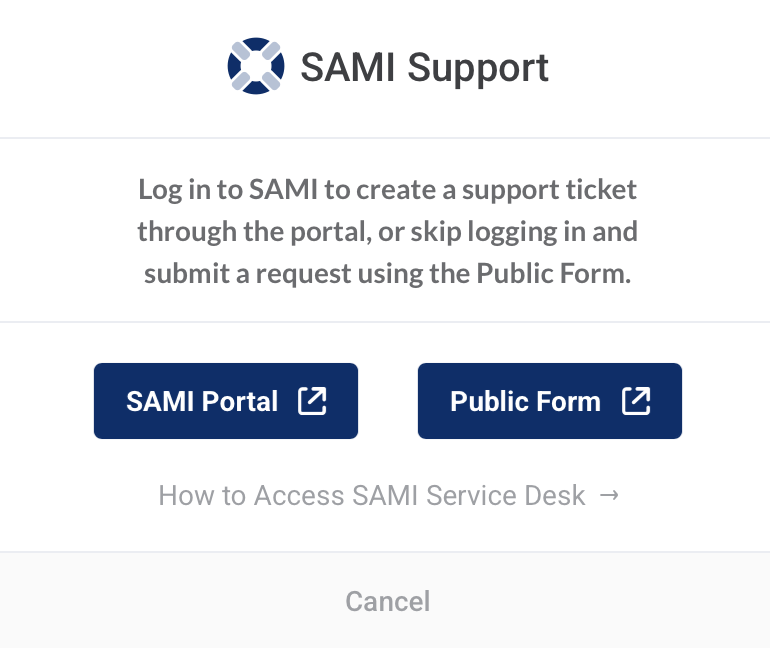
You can access the form by clicking the blue support icon at the top of of this website and then selecting “Public Form”

FDU IT Homepage
SAMI Support Popup Dialog Box

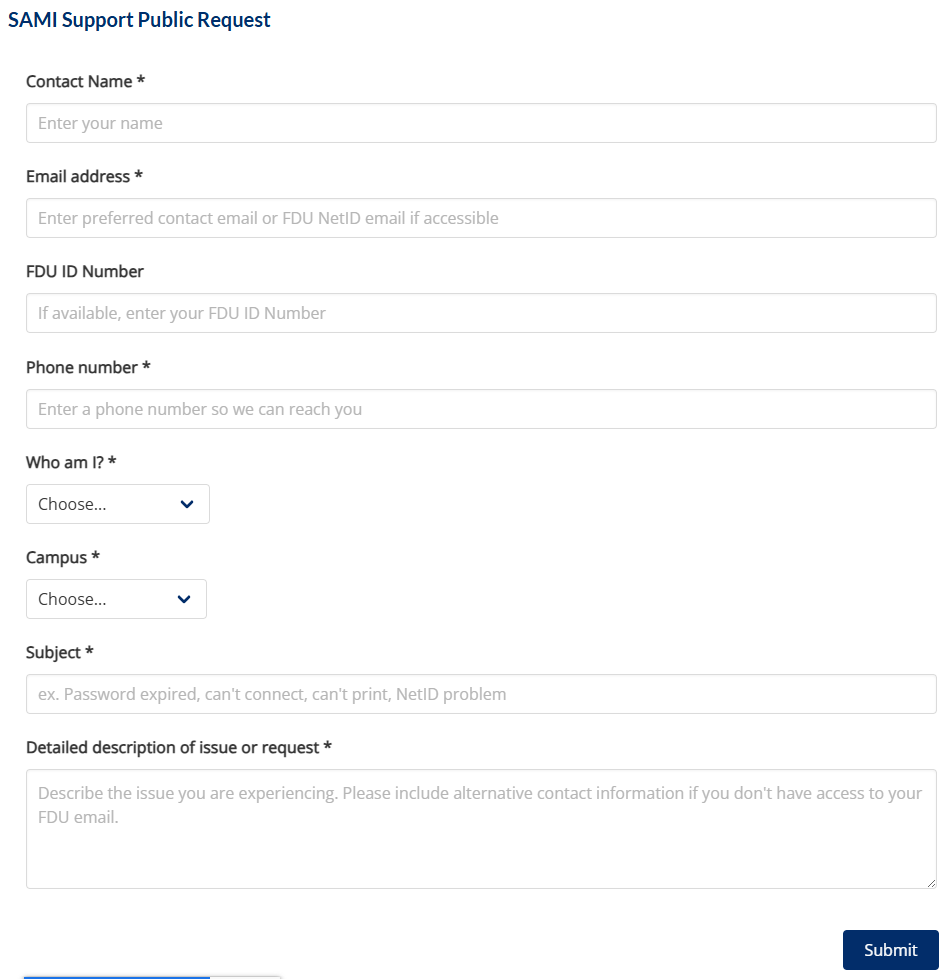
Once you reach the form, complete the requested fields and click “Submit”

Sami Support Public Request Form

While SAMISupport.fdu.edu remains the best option for most use cases, the Public Form is a quick, easy, and invaluable resource when needed.

Phone support via (973)-443-8822 will still be available as a legacy option. Calls will be answered by a virtual agent, who will attempt to assist you before transferring you to the Service Desk.

This update highlights the electronic-first approach of the new SAMI Service Desk.

Last Modified: icon icon Copy Link

SAMI Service Desk Launch Update

Posted:
December 1, 2025
icon Close

As previously announced, December 4th will mark the official launch of our new IT support team, the SAMI Service Desk. This journey began as a trial at the start of the fall semester. As our launch date approaches, here are some additional considerations:

In our new Service Desk, most of our agents are dedicated to handling issues submitted through the SAMI Support Self-Service portal and email. This differs from our previous UTAC Helpdesk model. While phone support will remain an option, the portal and email are now the most efficient ways to engage with the Service Desk.

If you choose to call, the virtual agent will first verify your identity by asking for your FDU ID number. This is the 7-digit number located on the back of your Fairleigh 1Card. Have that number ready when calling.

If you missed the original Tech Alerts sent on 11/17 and 11/24, you can watch the SAMI Short below, or continue reading.

The SAMI Service Desk is staffed with a full-time dedicated supervisor, two full-time agents, and seven student interns rotating shifts throughout the day. Tickets can be submitted through our self-service portal at SAMISupport.fdu.edu. If you are unable to log in to the portal, you can use our public form by clicking the blue support icon at on this website.

Submitting tickets through the portal or public form is the quickest and easiest way to get support. Since the trial began, tickets submitted this way have had an average first response time of 38 minutes.

The second quickest method is to email samisupport@fdu.edu, which replaces fdutac@fdu.edu.

If neither of these options works for you, you can call the SAMI Support Line at (973)-443-8822. Below are some changes you’ll notice when calling for support starting December 4th:

  1. The phone line will initially be answered by a Virtual Agent. Since the Virtual Agent must identify the user in the SAMI system, have your 7-digit FDU ID number ready when you call. This number is located on your FDU ID card.
  2. The Virtual Agent will then ask a series of questions to help resolve your issue.
  3. If the issue is resolved by the Virtual Agent, a closed SAMI ticket will serve as a record of the call. If it cannot be resolved, the call and an open SAMI ticket will be transferred to the Service Desk.
  4. The new Service Desk hours of operation are 8 AM to 8 PM ET, Monday through Friday. Calls received after hours, on weekends, and during holidays will be recorded by the Virtual Agent. SAMI tickets will be opened and queued for follow-up on the next business day.
  5. There will be automatic escalation to after-hours support personnel for urgent issues, such as system outages or weekend classroom incidents.

While the team’s handling of samisupport.fdu.edu and samisupport@fdu.edu requests has exceeded expectations, integrating the virtual agent and new contact center systems with our SAMI environment introduces a level of complexity. If your only option is to call, be aware that we may need to adjust some workflows in the first few weeks. Our team has made tremendous progress and is committed to making the SAMI Service Desk a significant improvement over our previous support model.

Last Modified: icon icon Copy Link

SAMI Service Desk Launch

Posted:
November 14, 2025
icon Close

December 4th will mark the official launch of our new IT support team, the SAMI Service Desk. This initiative began as a trial at the start of the fall semester. At that time, the new team began handling all SAMI self-service and public form tickets. In October, the trial expanded to include emails and introduced a new support address: samisupport@fdu.edu, replacing fdutac@fdu.edu. We are now ready to declare the trial a success and hand the new team full control over phone support. At a time when many businesses are outsourcing service centers, FDU will now have our entire support team on-site.

To learn about this change, watch for a brief four-minute SAMI short video or continue reading.

The SAMI Service Desk is staffed with a full-time dedicated supervisor, two full-time agents, and seven student interns rotating shifts throughout the day. Tickets can be submitted through our self-service portal at SAMISupport.fdu.edu. If you are unable to log in to the portal, you can access our public form by clicking the blue support icon at the top right of the FDU IT website.

Submitting tickets through the portal or public form is the quickest and most efficient way to receive support. Since the trial began, tickets submitted this way have had an average first response time of 38 minutes.

The second fastest way to get support is by emailing samisupport@fdu.edu, which now replaces fdutac@fdu.edu.

If neither method works for your situation, you can still call the SAMI support line at (973)-443-8822. Starting December 4th, you will notice the following changes when calling:

  • The phone line will be initially answered by a Virtual Agent.
  • The Virtual Agent will request your name, contact number, and FDU ID number to identify you in the SAMI ticketing system.
  • The agent will then ask a series of questions in an attempt to resolve the issue.
  • If successful, a closed SAMI ticket will serve as a record of the call.
  • If the issue cannot be resolved, the call and an open ticket will be transferred to the Service Desk.

New hours of operation for the SAMI Service Desk will be 8 AM to 8 PM ET, Monday through Friday. Calls received by the Virtual Agent outside of these hours—including weekends and holidays—will be recorded. Tickets will be opened and added to the queue for follow-up on the next business day.

Automatic escalation to after-hours support personnel will occur for critical concerns, such as system outages and weekend classroom issues.

While our handling of SAMISupport.fdu.edu and samisupport@fdu.edu has exceeded expectations, integrating the new Virtual Agent and contact center systems into the SAMI environment is complex. If your only option is to call, expect some workflow adjustments in the first few weeks. The team has made rapid progress and remains committed to making the SAMI Service Desk a major upgrade over our previous support model.

Last Modified: icon icon Copy Link

FDU Patching for Mac

Posted:
November 13, 2025
icon Close

To improve the security posture of university-issued Apple computers, OIRT is implementing a new patching workflow designed to keep non-FDU provided software on your macOS device up to date.

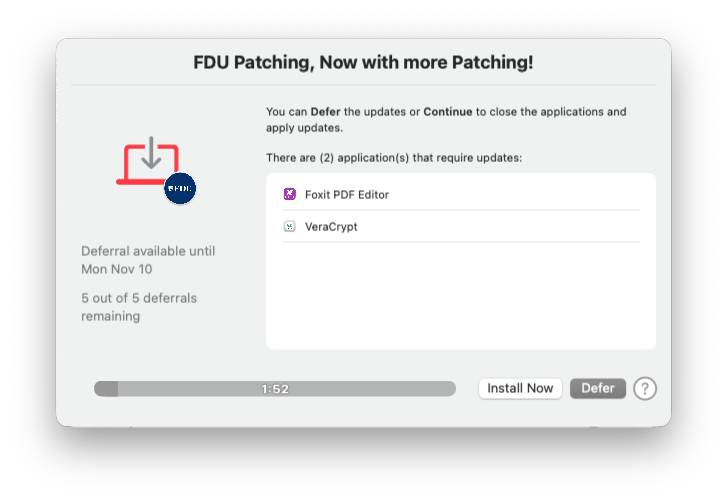
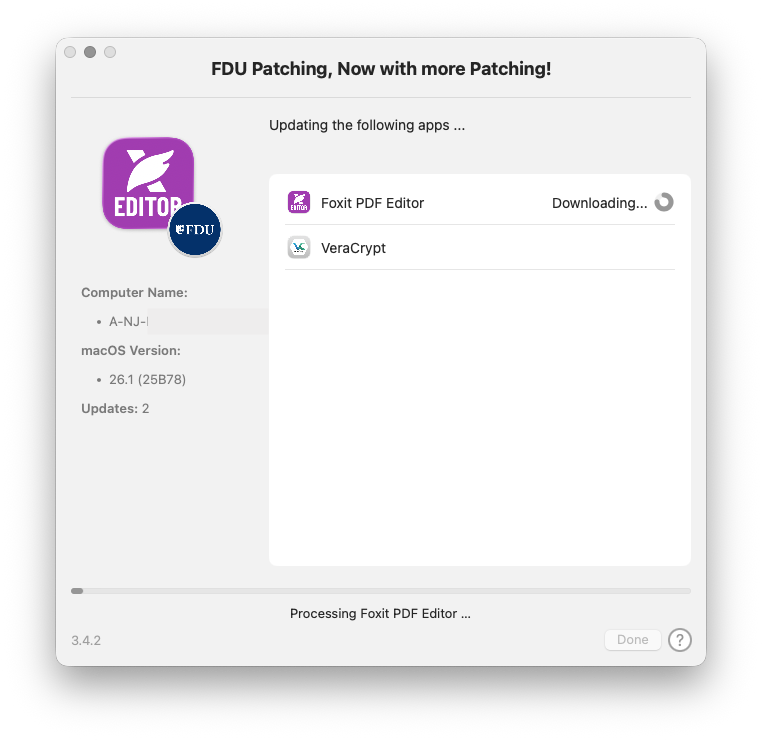
Once a month, a process will check the version of applications installed on your machine and, when needed, update them. When the process runs, you will see the following window:

You can either install the updates immediately by pressing Install Now or choose to install them later by pressing Defer.

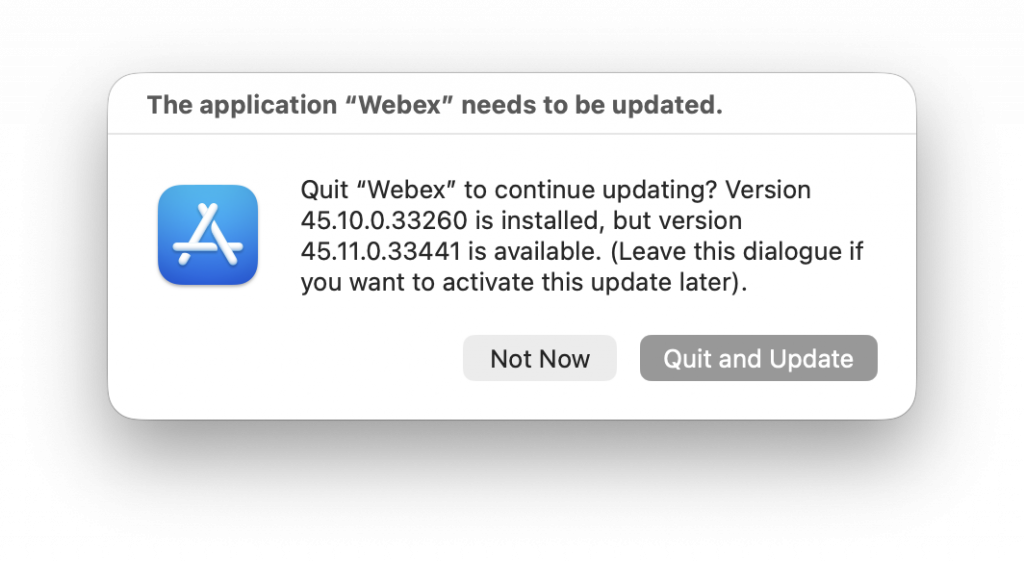
If an open application needs to be patched, you may receive a notification like the one shown below. In that case, select Quit and Update to close the app and update it, or Not Now to continue using it.

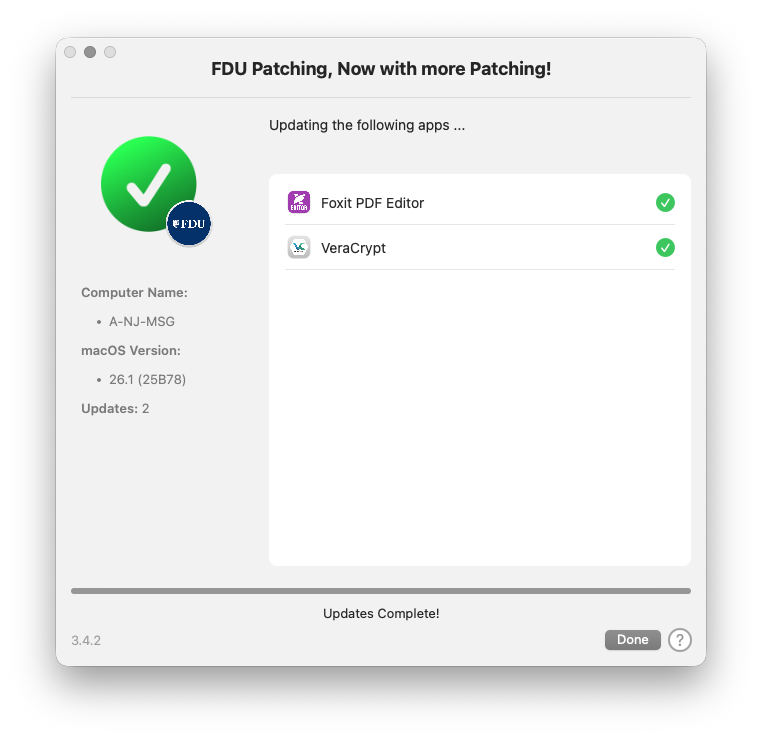
Once the patching is complete, click Done to close the window.

While the Defer option allows you to postpone updates to a more convenient time, all updates must be installed promptly. Every employee is responsible for maintaining the security of their FDU-issued devices.

For questions or concerns, visit SAMI Support to request additional information or search the IT knowledge base. Support is also available by phone at (973)-443-8822 or by email at samisupport@fdu.edu.

Last Modified: icon icon Copy Link

Transition from CR Snap and Chrome River Apps to Emburse Enterprise Mobile App

Posted:
October 10, 2025
icon Close

Emburse (Chrome River) will be sunsetting its legacy mobile apps that allow users to upload receipts and create and submit expense reports.

Users currently using CR Snap or the Chrome River App must transition to the new Emburse Enterprise Mobile App before November 30th. The new app can be downloaded from the Apple App Store or Google Play Store and allows you to log in with your NetID credentials.

For questions, email misrequests@fdu.edu.

Last Modified: icon icon Copy Link

Update: SAMI Support Team Trial

Posted:
October 8, 2025
icon Close

While FDU OIRT regularly unveils new initiatives aimed at improving the IT experience at the University, the Fall 2025 semester has been among our most ambitious. At the start of the semester, FDU OIRT announced the trial of a new support solution that uses a dedicated team of FDU technicians to provide enhanced support when requests are submitted through our SAMI Support Portal. A public form is also available to ensure that individuals unable to authenticate can receive the same level of service. In mid-September, we introduced SAMI Shorts—brief videos that help explain the technology we offer and how our community can best utilize it.

How has the trial gone?

The SAMI Service Desk has handled nearly 1,000 tickets since the beginning of the trial. Over 90% of tickets were responded to within 3 hours, and over half were resolved within 24 hours. Of the 12 tickets rated by users, ten received a 5 out of 5. Initial feedback indicates strong engagement with our SAMI Short videos as well. These are clear signs that we are heading in the right direction.

What’s next?

Starting October 14, we will expand the trial to include support requests initiated via email. While the preferred method for submitting a ticket remains the SAMI Support Portal, community members can now email support requests to samisupport@fdu.edu.

Will the old email address still work?

Yes. While FDUTAC@fdu.edu will still function for now, tickets sent to that address will be routed to the SAMI Service Desk instead of our third-party team.

What else is changing?

With the introduction of our new Student Internship Program, we now have a group of trained students supplementing our staff of dedicated FDU technicians. Once fully launched, the internship program will bring the total number of Service Desk personnel to six during peak hours.

What’s not changing?

Our third-party Technical Assistance Center, UTAC, is still available at (973)-443-8822.

Why are we doing this?

As we become increasingly reliant on technology to teach, learn, and manage the business of higher education, OIRT continues to evolve our services to be better, faster, and more accurate. The new internal Service Desk initiative directly supports this goal and aligns our support model with best practices in higher education.

Last Modified: icon icon Copy Link

Network Equipment Upgrade

Posted:
October 3, 2025
icon Close

On October 10th, between 2AM and 6AM, USAN will perform an upgrade of network equipment in the following buildings. During this maintenance, users in these buildings may experience intermittent network outages.

Florham Campus

  • Barn
  • Chaine House
  • The Cottages
  • Dreyfuss Building
  • EOF Building
  • Gatehouse
  • Library
  • Mansion
  • Monninger Center
  • Park Avenue North and South
  • PR Building
  • Rec Center
  • Rothman Center
  • Rutherford Building
  • School of Pharmacy
  • Science Building
  • Student Center
  • Twombly (Hamilton/Florence/I-Wing)
  • Villages 1–9
  • Wellness Center
  • Zen Building

Metropolitan Campus

  • 835 SUB Lane (Dean of Students)
  • Alumni Hall
  • Bancroft Hall
  • Dickinson Hall
  • Edward Williams College
  • EOF Building
  • Fitness Center
  • Giovatto Library
  • ISS Building
  • Kron Building
  • Linden 1–8
  • Muscarelle Hall
  • Northpointe Building
  • Public Safety
  • Purchasing Building
  • Residence Life
  • River House
  • Robison Hall
  • Bogota Center
  • Student Counseling and Psychological Services
  • Student Union Building
  • 131/139 Temple Avenue
  • University Court 1–10
  • University Hall
  • Williams Hall

We understand the inconvenience that network downtime can cause for our community. We schedule this work during times that minimize impact. For questions or concerns, visit SAMI Support to request additional information from UTAC or search our IT knowledge base. You can also contact UTAC by phone at (973) 443-8822 or email fdutac@fdu.edu.

Last Modified: icon icon Copy Link

Introducing the FDU-Guest Wireless Network Segment

Posted:
September 17, 2025
icon Close

FDU OIRT is excited to announce FDU-Guest, a new wireless network (SSID) for guests visiting our New Jersey campuses. FDU-Guest simplifies the guest access process while improving network security. Guests can connect without needing sponsorship from a member of the FDU community, while access to internal FDU resources remains restricted to active Faculty/Staff and Students.

With this addition, the FDU wireless network now has four distinct segments: FDU-Secure, FDU-Wireless, Eduroam, and FDU-Guest.

When to use each network segment:

  • FDU-Secure: The primary SSID for most of our community. Requires authentication, grants access to all internal services, and has priority for academic and business traffic.
  • FDU-Wireless: For non-computer devices such as gaming consoles or SmartTVs that cannot use WPA2 Enterprise authentication. These devices can be registered on the FDU MyDevices Portal.
  • Eduroam: A secure, worldwide roaming service for international research and education. Students, researchers, and staff from participating institutions can connect at FDU using their home institution’s credentials.
  • FDU-Guest: A public, non-authenticated network for University guests. Users must agree to the Acceptable Use Policy, and sessions remain active for one day. This network provides internet access only—services requiring SSO access are blocked.

Traditional Guest Wireless and Guest Group Creation forms remain available on SAMI Support for visitors who require advanced services such as on-campus printing, access to Zoom carts, or library resources.

Watch our SAMI Short video about FDU-Guest:

FDU-Guest Wireless

Full directory of SAMI Short videos:

SAMI Shorts Catalog

FDU-Guest is now available on both New Jersey campuses via the Wi-Fi SSID dropdown menu. If you are unsure which solution is best for your situation or have questions, open a SAMI Support ticket to request more information or search the IT knowledge base. You can also contact UTAC at (973)-443-8822 or email fdutac@fdu.edu.

Last Modified: icon icon Copy Link

Technology Orientation Registration

Posted:
September 4, 2025
icon Close

Computing Services invites you to a Technology Orientation covering the many applications and classroom technologies available at the University. This engaging two-hour session provides an overview of the AV technology in classrooms, the SAMI support portal, and University applications that enhance the teaching and learning experience.

The orientation will include:

  • An introduction to classroom equipment
  • Best practices for utilizing technology
  • A demonstration of the SAMI Support Portal
  • How to create a support ticket
  • How to create a lab reservation
  • How to request technology and IT support for events
  • An overview of key applications, including:
    • WebCampus/Blackboard
    • Qualtrics
    • Zoom
    • Echo360
    • Kaltura/Mediaspace
    • MyFDU Connect
    • Self-Service

Morning and afternoon sessions will be held both in-person and via Zoom:

  • Thursday, September 11 – Metropolitan Campus, Alumni Hall
  • Friday, September 12 – Florham Campus, Mansion, Hartman Lounge

With so many great tools on offer, this is a chance to discover your next favorite application.

Technology Orientation Registration Form

After completing the registration form, you will receive an email and Outlook Calendar invitation confirming your registration. We look forward to seeing you at orientation.

Last Modified: icon icon Copy Link

Transition from DocuSign to SoftDocs

Posted:
September 2, 2025
icon Close

We have completed our migration from DocuSign forms to Softdocs forms. Softdocs provides a platform to create customized forms and workflows for digital documents. It offers a secure way to capture data and electronic signatures from faculty, staff, and students.

All links on the FDU website have been updated to point to the new corresponding form. While the presentation of the forms will look different from DocuSign, the process remains straightforward.

If you have any issues or questions, contact misrequests@fdu.edu for assistance.

Last Modified: icon icon Copy Link

SAMI Shorts

Posted:
August 27, 2025
icon Close

The Office of Information Resources and Technology (OIRT) has made a focused effort to enhance the level of support provided to the FDU community. We have developed a new approach for delivering important information about the technology available to our users.

SAMI Shorts are brief informational videos designed to provide key insights on a variety of IT-related topics. Most videos range from 45–90 seconds, include closed captioning, and are also available in text format.

To introduce this new format, watch our Welcome Back video here:

Welcome Back – SAMI Short

Last Modified: icon icon Copy Link

SAMI Support Team Trial

Posted:
August 19, 2025
icon Close

The University Technical Assistance Center (UTAC) has been integral to FDU’s IT support strategy since 2002. Of the over 20,000 support tickets generated for the FDU community each year, thousands originate with calls or emails to UTAC. As we become increasingly reliant on technology to teach, learn, and manage the business of higher education, OIRT is continually seeking ways to provide better, faster, and more accurate service to our community.

At the start of the Fall Semester, FDU OIRT will trial a new support solution using a dedicated team of FDU technicians to provide enhanced support for tickets submitted through the SAMI Support Portal:

SAMI Support

The portal, which can be accessed via laptop, desktop, and mobile devices, as well as through MyFDUConnect.

My FDU Connect

Which provides an easy way to register an issue or question and communicate directly with the technician assigned to your request. The site also suggests possible solutions without needing to interact with a technician.

If a user cannot authenticate into the SAMI Support Portal, there is a public form available:

Issues submitted through the SAMI Public Form will also be supported by the new team.

While existing UTAC phone and email support will remain available throughout the trial period, we encourage the community to begin using SAMI Support in the coming weeks to interact with the new team.

Last Modified: icon icon Copy Link

FDU-Secure Certificate Update

Posted:
August 14, 2025
icon Close

On Friday, August 15, between 7:00 AM and 11:00 AM Eastern, the FDU-Secure wireless network will be updated with a new wireless SSL certificate. Wireless certificates are a security mechanism that are designed to expire periodically.

Upon your first connection to FDU-Secure after the update, you will be prompted to accept the new certificate. The tutorial linked below can assist with completing the security acceptance process for common platforms including macOS, Windows, Android, and Apple mobile (iOS) devices.

SAMI Support

If you have any questions or concerns, please visit SAMI Support, where you can request additional information from UTAC or search our extensive IT knowledge base. While SAMISupport provides the quickest and easiest access for IT support, you can always contact UTAC by phone (973)-443-8822 or email at fdutac@fdu.edu.

Last Modified: icon icon Copy Link

Phishing Attempts

Posted:
August 11, 2025
icon Close

OIRT constantly monitors our network for new phishing attempts and implements rules to prohibit these messages from being delivered to our email system. We catch and delete over 90% of phishing emails before they reach our community. However, we can never catch 100% without blocking a percentage of legitimate emails, so it is vital that our community ensures every email is legitimate before responding.

Recently, the FDU email domain experienced two phishing attacks. The first, shown below, was sent from a compromised FDU email account and requested that you verify information via an external link to avoid account deactivation.

Another phishing attempt claimed to be a job opportunity and requested that you reply via email with your cell number and alternate email address. As a reminder, all faculty, staff, and student communications must be conducted exclusively through the official FDU email system. To ensure security, confidentiality, and proper record-keeping of university-related correspondence, employees should not use Gmail or any other personal email addresses when communicating with faculty, staff, or students. Using your official FDU email account helps maintain compliance with university policies and protects sensitive information from potential security risks. All professional communications must be sent and received via your @fdu.edu email address.

Our team has contained the issue by removing the messages from FDU inboxes and assisting the compromised FDU user. If you believe you may have provided personal information to this phisher, such as your NetID password, stop communication with the scammer, change your password, and create a support ticket at SAMI Support. In your Support Ticket, specify what information was provided to the scammer. While SAMI Support is the quickest way to get IT assistance, you can also contact UTAC by phone at (973)-443-8822 or by email at fdutac@fdu.edu.

Review our phishing tutorial to learn additional tips for detecting phishing emails:

If you have encountered a phishing email you would like to report, visit:

Last Modified: icon icon Copy Link

Unified Communications Testing

Posted:
August 7, 2025
icon Close

On August 14, between 6:30 AM and 8:30 AM Eastern, USAN will be testing the redundancy of our Unified Communications system. This is not expected to impact users; however, desktop phones may experience minor anomalies such as a brief moment of dead air during the maintenance window.

SAMI Support

If you have any questions or concerns, please visit SAMI Support, where you can request additional information from UTAC or search our extensive IT knowledge base. While SAMISupport provides the quickest and easiest access for IT support, you can always contact UTAC by phone (973)-443-8822 or email at fdutac@fdu.edu.

Last Modified: icon icon Copy Link

OIRT VPN Group Downtime

Posted:
July 28, 2025
icon Close

On Wednesday, 7/30, between 7:00 PM and approximately 9:00 PM, OIRT will be performing a test of the Duo Proxy Server for the VPN.

Users already connected when testing begins will not be affected. However, during this period, connecting to the “4-OIRT-MFA” VPN group may be impacted. If you experience issues, switch to the “1-Employees-MFA” VPN group to access the majority of FDU resources.

SAMI Support

If you have any questions or concerns, please visit SAMI Support, where you can request additional information from UTAC or search our extensive IT knowledge base. While SAMISupport provides the quickest and easiest access for IT support, you can always contact UTAC by phone (973)-443-8822 or email at fdutac@fdu.edu.

Last Modified: icon icon Copy Link

Unified Communications Testing

Posted:
July 15, 2025
icon Close

On July 22nd between 6:30 AM and 8:30 AM Eastern, USAN will be testing redundancy of our Unified Communications system. This is not expected to impact users; however, desktop phones may experience minor anomalies such as a brief second of dead air during this window.

SAMI Support

If you have any questions or concerns, please visit SAMI Support, where you can request additional information from UTAC or search our extensive IT knowledge base. While SAMISupport provides the quickest and easiest access for IT support, you can always contact UTAC by phone (973)-443-8822 or email at fdutac@fdu.edu.

Last Modified: icon icon Copy Link